 AI & Automation
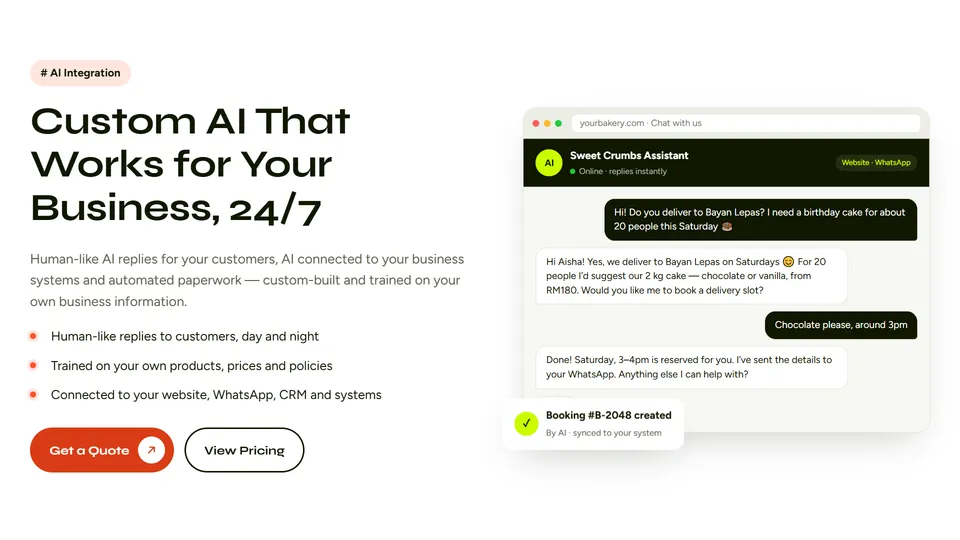
A human-like AI chatbot answers your customers on your website and WhatsApp 24/7, in natural language, using your own products, prices and policies — and the best ones reply in your style and keep learning from you. This guide explains how Webbily’s AI Chatbot & WhatsApp AI service works, how it learns to sound like the business owner, when to use website chat versus WhatsApp, what it should and shouldn’t answer, and how to get one running on your site.
Key takeaways
- A human-like AI chatbot replies in natural sentences from your own business information — not rigid menus or generic answers.
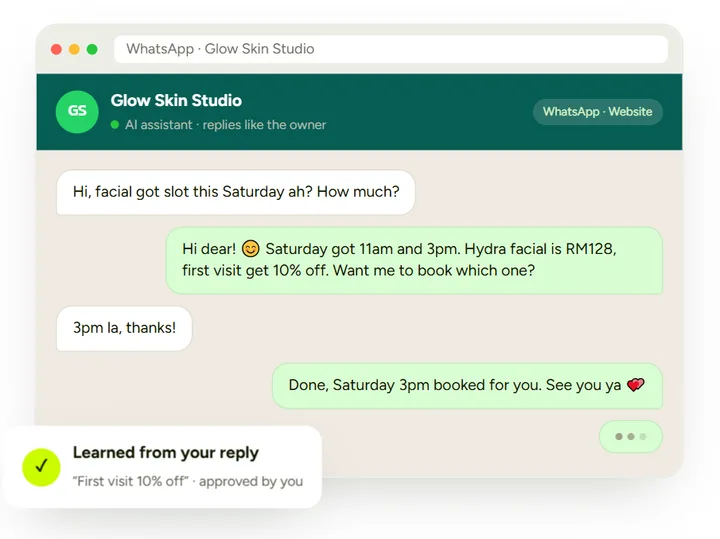
- Webbily’s chatbot copies how you reply (tone, greetings, emoji, even Manglish) and learns new facts from your replies — only after you approve them.
- One assistant covers your website and WhatsApp, hands orders and tricky questions to you, and saves leads to your CRM.
- It installs with one line of code on WordPress, Shopify, WooCommerce or any website.
- You can see it live on this site — click “Chat with Jess” — or ask for a free quote.
What is a human-like AI chatbot?
A human-like AI chatbot is a customer-service assistant powered by a large language model that understands what a customer writes in their own words and replies in natural, conversational language. Unlike a traditional chatbot, it doesn’t force people through buttons or keywords. And unlike a generic AI chat tool, a business chatbot is grounded in your information, so it answers with your real prices, stock, delivery areas and opening hours.
The “human-like” part matters. Customers can tell within one message whether they are talking to a stiff bot. A good assistant greets them the way your team would, answers the actual question, asks one sensible follow-up and knows when to bring in a real person.
Why old-style chatbots lose customers
Research on chatbot usability from the Nielsen Norman Group has long shown the same frustrations: bots that don’t understand ordinary wording, loop users through menus and make it hard to reach a person. Here is how a modern AI assistant compares:
| Menu / rule-based chatbot | Human-like AI chatbot | |
|---|---|---|
| How customers type | Buttons and exact keywords | Any wording, any language mix |
| Answers | Only what someone scripted | From your products, prices, policies and documents |
| Tone | Robotic and repetitive | Matches how the owner replies |
| New questions | “Sorry, I didn’t understand” | Understands intent; hands over when unsure |
| Improves over time | Only when someone edits the script | Learns from the owner’s replies (with approval) |
| Leads | Often lost | Name and contact saved to your CRM |
How Webbily’s AI chatbot works
Our service runs on FiveBatch, the AI platform we built and use for our own businesses. Behind the friendly chat bubble, five things happen:
- It knows your business. We set up its knowledge from your website, price list, FAQs and policies. Every answer is drawn from that — it never invents a price or promise.
- It writes like you. It reads your recent real replies to customers and uses them as the voice to copy.
- It learns, with your approval. When you answer a customer yourself, it picks up new facts — a price, a delivery rule — and suggests them. Nothing is used until you approve it.
- It hands over at the right moment. Orders, complaints and anything it isn’t sure about are flagged to you by email or WhatsApp with a suggested reply, and you can take over the chat live.
- It saves the lead. Visitors can leave their name and WhatsApp number or email; they land in your CRM pipeline, where AI scores how ready they are to buy.
How the chatbot learns to reply like the business owner
This is what makes the assistant feel personal rather than corporate. It works in two separate ways:
1. Your writing style
Each time you reply to a customer yourself — in the website chat, WhatsApp or the AI Inbox — your own wording is kept as an example. The assistant studies your most recent replies and copies the voice: how you greet people, how long your messages are, your emoji, and the language mix your customers use, such as English, Malay, Chinese or Manglish. Replies that were the AI’s words, sent unchanged, are not counted — so it learns from you, not from itself.
2. Your business facts
When you answer a question or rewrite one of its drafts, the assistant looks for knowledge worth reusing — for example “first visit gets 10% off” or “we deliver to Penang island on Saturdays”. It saves those as suggestions. You approve the ones that are right, and only then do they become part of what it tells customers. One-off details about a single customer are skipped.
Website chatbot or WhatsApp AI — which do you need?
| Channel | Best for | How it works |
|---|---|---|
| Website chatbot | Visitors browsing your site who want a quick answer before buying or booking | A chat bubble on every page; the AI answers instantly and can collect contact details |
| WhatsApp button | Customers who prefer to message you personally | A free button beside the chat that opens WhatsApp with a ready-made first message |
| WhatsApp AI | Businesses that get many WhatsApp enquiries every day | WhatsApp Business connected through the official WhatsApp Business Platform; the AI drafts or sends replies |
Most small businesses do best with both: the AI chatbot catches website visitors at any hour, while WhatsApp handles customers who already know you. Visitors simply choose how they want to talk.
What the AI chatbot should — and shouldn’t — answer
A trustworthy assistant is clear about its limits. Ours is set up so that it:
- Answers confidently: prices, packages, availability, opening hours, delivery and payment options, how a service works — anything in your knowledge.
- Moves sales forward: confirms what the customer wants and gives the next step, such as booking a slot or ordering on WhatsApp.
- Hands over: complaints, custom quotes, refunds and anything it can’t confirm go to you, with a suggested reply ready.
- Never guesses: if a fact isn’t in your knowledge, it says it will check rather than inventing an answer.
You also choose the reply mode: auto-reply for instant answers, or draft for approval if you want to check every message before it goes out.
A real example: the chatbot on webbily.com
We use the same assistant on our own website. Click “Chat with Jess” in the corner of this page and ask about website packages, an AI integration project or a custom business system — Jess answers from Webbily’s own knowledge, offers WhatsApp if you prefer, and passes anything she can’t confirm to our team.
How to add an AI chatbot to your website in 4 steps
- Teach it your business: share your website, price list, FAQs and policies. We set up the knowledge and check the answers.
- Install it: one line of code adds the chat to WordPress, Shopify, WooCommerce or any custom site. We style it to match your brand and add the WhatsApp button.
- Set the rules: reply mode, business hours, which questions always go to you, and where alerts are sent.
- Reply, teach and grow: keep answering customers as usual — the assistant learns your style and new facts — and we review conversations with you each month.
Building a new website at the same time? Our web development and e-commerce projects can include the chatbot from day one.
WhatsApp rules every business should know
- Use the official platform. Automating a personal WhatsApp number with unofficial tools can get the number restricted. Business automation runs through Meta’s official WhatsApp Business Platform with a verified business account.
- The 24-hour window. After a customer messages you, you can reply freely within 24 hours; after that, WhatsApp only allows pre-approved template messages. Meta explains the rules in its WhatsApp Business Platform documentation.
- Respect opt-in. Only message customers who contacted you or agreed to hear from you.
Privacy and trust
Be open that customers are chatting with an AI assistant, and always offer a way to reach a person. Collect only the details you need, and handle them in line with Malaysia’s Personal Data Protection Act (PDPA). The assistant runs on business AI services such as Google’s Gemini API, and your knowledge, conversations and leads remain yours.
Common AI chatbot mistakes to avoid
- No knowledge, only a model: an AI without your real information will sound fluent but give vague or wrong answers.
- No way to reach a person: always provide a hand-over and a WhatsApp option.
- A voice that isn’t yours: generic, formal replies feel cold. Let it learn from your own messages.
- Setting and forgetting: review what customers ask, approve new facts and update prices when they change.
- Hiding it: a chat bubble buried in a footer gets no conversations. Keep it visible on every page.
Frequently asked questions
What is the difference between a chatbot and an AI chatbot?
A traditional chatbot follows a fixed script of buttons and keywords. An AI chatbot uses a language model to understand any wording and reply naturally, and a business AI chatbot answers from that business’s own products, prices and policies.
Can an AI chatbot really sound like the business owner?
Yes. Webbily’s chatbot studies the owner’s recent replies to customers — greetings, tone, emoji and language mix — and uses them as the voice to copy, so replies feel personal rather than robotic.
Does the chatbot learn on its own?
It learns from the owner’s replies, but safely: new facts it finds are saved as suggestions and only used after the owner approves them. It never changes your prices or policies by itself.
Can the AI chatbot reply on WhatsApp?
Yes. With WhatsApp Business connected through the official platform, the same assistant drafts or sends WhatsApp replies. You can also simply add a free WhatsApp button beside the website chat.
Will the chatbot work on my WordPress website?
Yes. It installs with one line of code on WordPress, Shopify, WooCommerce and any custom website, and Webbily installs and styles it for you.
What happens when the chatbot can’t answer?
It tells the customer it will check, alerts the owner by email or WhatsApp with a suggested reply, and the owner can take over the chat live.
How much does an AI chatbot cost for a small business?
Webbily charges a one-time setup and a monthly plan based on your channels and conversation volume. Send your website for a fixed quote within 24 hours.
Get your own AI chatbot
Tell us your website and roughly how many enquiries you get each week. We will set up an AI chatbot that knows your business, replies like you on your website and WhatsApp, and sends every lead to your CRM. See the AI Chatbot & WhatsApp AI service, start your project brief or contact the Webbily team. Want the bigger picture first? Read our guide to AI integration for business, or check your current site with the free website audit.