 Business Systems
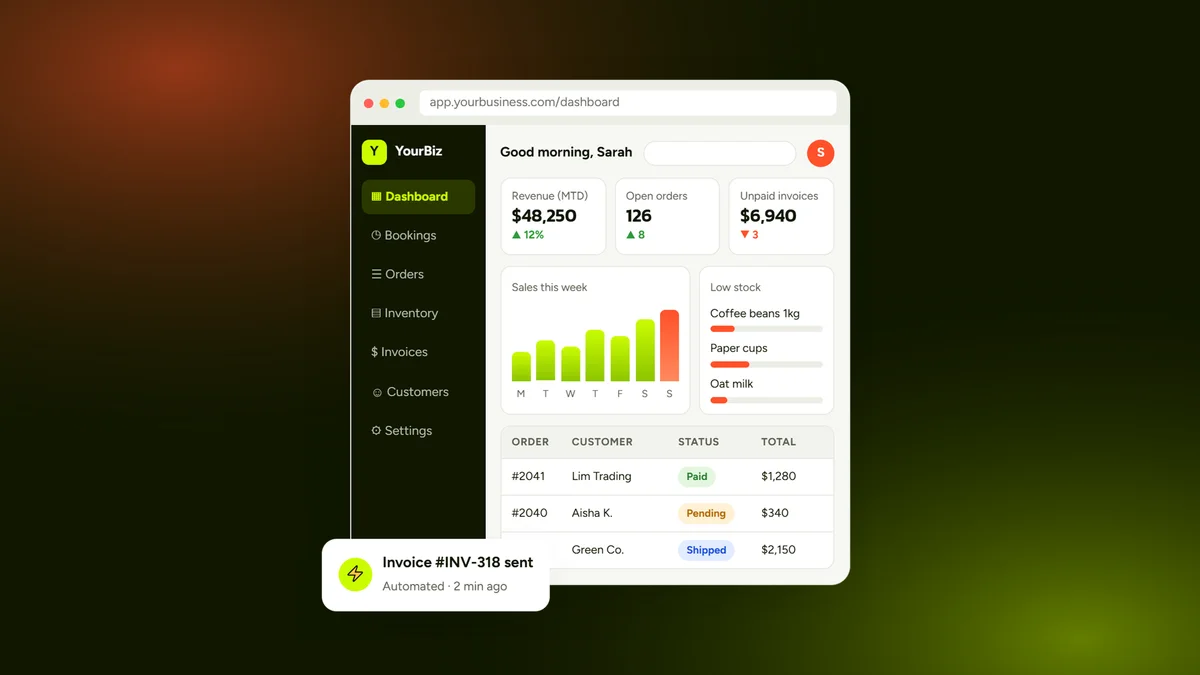
If your business runs on spreadsheets, WhatsApp threads, paper forms and five apps that don’t talk to each other, you are not alone — and you are probably losing hours every week to copying data, chasing updates and fixing mistakes. A custom business system brings everything into one secure web application built around how your team actually works. This guide explains what custom business software is, when it beats off-the-shelf tools, which features matter most, what it costs in 2026 and how to get started.
Key takeaways
- A custom business system is a secure web app that combines customers, orders, stock, invoices, bookings and reports in one place.
- It pays off when your process is unique, your tools are disconnected or subscription fees keep growing.
- The most valuable features are dashboards, user roles, automation and integrations.
- Webbily builds custom business systems from $3,499 (simpler web apps from $1,499).
- Start with a free project assessment to map your workflow and get a fixed quote.
What is a custom business system?
A custom business system — also called custom business software, an internal tool or a business web application — is software designed for one company’s specific processes. Instead of bending your workflow to fit a generic app, the system is built to match how you take orders, schedule jobs, manage stock, invoice customers and report results.
Most modern systems are web-based: your team signs in from a browser on a laptop, tablet or phone, and all data lives in one secure database. Typical examples include a custom CRM, an inventory and order management system, a booking and scheduling system, a client portal or an operations dashboard that combines all of these.
Signs your business has outgrown spreadsheets
- The same data is typed in several places — a sale is recorded in a spreadsheet, an invoice tool and a WhatsApp message.
- Nobody trusts the numbers because files are out of date or have conflicting versions.
- Staff spend hours on repetitive admin — reminders, follow-ups, copying orders, building weekly reports.
- You pay for many subscriptions that each solve part of the problem but don’t connect.
- Customers keep asking for updates that they could check themselves in a portal.
- Growth makes it worse — every new staff member or branch adds more manual work.
If three or more of these sound familiar, a custom system will usually save time within months, not years.

Custom software vs. off-the-shelf SaaS
Ready-made software-as-a-service (SaaS) tools are a great starting point. The question is whether they still fit as you grow.
| Factor | Off-the-shelf SaaS | Custom business system |
|---|---|---|
| Fit to your process | You adapt to the software | Software adapts to you |
| Upfront cost | Low | Higher (from $3,499 at Webbily) |
| Ongoing cost | Per-user fees that grow with your team | Hosting and maintenance, no per-user fees |
| Integrations | Limited to what the vendor offers | Connect the tools you actually use |
| Ownership | Data lives in the vendor’s platform | You own the code and the data |
| Competitive advantage | Same tool as your competitors | A workflow competitors can’t copy |
Many businesses use a mix: standard tools for email and accounting, and a custom system that connects them and handles the work that makes the business unique.
Essential features of a business system
1. Dashboards and reports
Live revenue, orders, jobs and stock at a glance — no more building weekly reports by hand.
2. User roles and permissions
Staff, managers, admins and customers each see only what they need, which keeps data secure and screens simple.
3. Workflow automation
Automatic invoices, payment reminders, low-stock alerts, approval steps and WhatsApp or email notifications remove repetitive admin.
4. Customer and client portals
Let customers log in to view orders, bookings, invoices and documents — fewer “any update?” messages for your team.
5. Integrations and APIs
Connect payment gateways, accounting software, Google Workspace, email marketing and messaging so data flows automatically.
6. Mobile-friendly access
A responsive web app works on any device. For field teams, it can be built as a progressive web app (PWA) or extended with a dedicated Android or iOS app.

Common types of custom business systems
- Custom CRM — leads, customers, follow-ups and sales pipeline.
- Inventory and order management — stock levels, purchase orders, suppliers and fulfilment.
- Invoicing and billing — quotes, invoices, payments and statements. Our own Invoiceror platform is an example of this kind of system.
- Booking and scheduling — appointments, staff rosters, rooms and equipment.
- Job and project tracking — tasks, timesheets, site reports and approvals.
- Client portals — secure document sharing, progress updates and self-service.
- HR and staff management — leave, onboarding, training records and performance reviews.
How much does a custom business system cost in 2026?
At Webbily, custom business systems start from $3,499, with annual maintenance from USD 299. Smaller, single-purpose web apps start from $1,499. The final price depends on:
- the number of modules (for example CRM + inventory + invoicing),
- how many screens and user roles you need,
- integrations with payments, accounting or other software,
- data migration from existing spreadsheets or systems,
- reporting and automation complexity.
These are starting prices. Final pricing depends on project scope, features, integrations and complexity. For a wider breakdown of website and app budgets, read our website and app cost guide.
How we build a business system: step by step
- Discovery and workflow mapping — we interview your team, map how work flows today and agree what the first version must do.
- Clickable prototype — you try the key screens before any code is written, so changes are fast and cheap.
- Build in sprints — development in short cycles with regular demos and feedback.
- Data import and testing — we move your existing data in and test every workflow with real scenarios.
- Launch, training and support — go-live, staff training and ongoing maintenance and improvements.

Security, data protection and ownership
A business system holds your most valuable data, so security is built in from the start: encrypted connections (HTTPS), role-based access, secure authentication, regular backups and activity logs. If you handle personal data, the system should support your obligations under local privacy laws — such as Malaysia’s Personal Data Protection Act (PDPA) — and, for European customers, the GDPR.
With Webbily, you own the source code, the database and the hosting accounts once the project is paid in full, so you are never locked in.
Is a custom system right for a small business?
Yes — especially for small businesses that are growing fast. A focused first version that automates your two or three most time-consuming tasks often pays for itself in saved staff hours and fewer mistakes. The U.S. Small Business Administration highlights strong operations and record-keeping as key to managing a growing business — exactly what a good system delivers.
Webbily works with businesses in Penang, across Malaysia and internationally. Explore our custom business systems service, see web apps we have built, or compare our app and system pricing.
Frequently asked questions
What is a custom business system?
A custom business system is software built specifically for one company’s way of working — usually a secure web application staff log in to from a browser. It brings customers, orders, jobs, stock, invoices and reports into one place and replaces spreadsheets and disconnected tools.
How much does custom business software cost?
At Webbily, custom business systems start from $3,499, and simpler web apps start from $1,499. The final price depends on the number of modules, screens, user roles, integrations and how complex your workflows are. A free project assessment gives you an accurate quote.
Is custom software better than off-the-shelf SaaS?
Off-the-shelf SaaS is quicker to start and works well for standard processes. Custom software is better when your workflow is unique, when you pay for many tools that don’t connect, or when per-user subscription fees keep rising. Many businesses combine both, connected through integrations.
How long does it take to build a business system?
A focused first version (MVP) with the core modules usually takes 8–14 weeks. Larger systems are delivered in phases, so your team can start using the most important features early.
Can a business system work on mobile phones?
Yes. Modern business systems are responsive web apps that work on desktop, tablet and mobile browsers. If you need offline use or push notifications, a dedicated Android or iOS app can be added.
Who owns the software and the data?
With Webbily, you do. Once the project is paid in full, the source code, database and hosting accounts belong to your business.
Get a free project assessment
Tell us how your business works today and what slows you down. We will map your workflow and reply with a recommended solution, scope and quote — no payment required. Start your project brief or contact the Webbily team.